TaskFlow
DashboardFreewriteWhiteboardsProjectsCRMTasksNotificationsSettingsAgent TowerAPI Docs
OpenClaw Docs
?

User

Member

Caricamento in corso...

Home
Progetti
Task
Notifiche
CRM

    OpenClaw

    Documentation Mirror

    Documentation Overview

    Docs

    Auth credential semantics
    Scheduled tasks
    Hooks
    Automation & tasks
    Standing orders
    Task flow
    Background tasks
    BlueBubbles
    Broadcast groups
    Channel routing
    Discord
    Feishu
    Google Chat
    Group messages
    Groups
    iMessage
    Chat channels
    IRC
    LINE
    Channel location parsing
    Matrix
    Matrix migration
    Matrix push rules for quiet previews
    Mattermost
    Microsoft Teams
    Nextcloud Talk
    Nostr
    Pairing
    QA channel
    QQ bot
    Signal
    Slack
    Synology Chat
    Telegram
    Tlon
    Channel troubleshooting
    Twitch
    WeChat
    WhatsApp
    Yuanbao
    Zalo
    Zalo personal
    CI pipeline
    ACP
    Agent
    Agents
    Approvals
    Backup
    Browser
    Channels
    Clawbot
    `openclaw commitments`
    Completion
    Config
    Configure
    Cron
    Daemon
    Dashboard
    Devices
    Directory
    DNS
    Docs
    Doctor
    Flows (redirect)
    Gateway
    Health
    Hooks
    CLI reference
    Inference CLI
    Logs
    MCP
    Memory
    Message
    Migrate
    Models
    Node
    Nodes
    Onboard
    Pairing
    Plugins
    Proxy
    QR
    Reset
    Sandbox CLI
    Secrets
    Security
    Sessions
    Setup
    Skills
    Status
    System
    `openclaw tasks`
    TUI
    Uninstall
    Update
    Voicecall
    Webhooks
    Wiki
    Active memory
    Agent runtime
    Agent loop
    Agent runtimes
    Agent workspace
    Gateway architecture
    Channel docking
    Inferred commitments
    Compaction
    Context
    Context engine
    Delegate architecture
    Dreaming
    Experimental features
    Features
    Markdown formatting
    Memory overview
    Builtin memory engine
    Honcho memory
    QMD memory engine
    Memory search
    Messages
    Model failover
    Model providers
    Models CLI
    Multi-agent routing
    OAuth
    OpenClaw App SDK
    Presence
    QA overview
    Matrix QA
    Command queue
    Steering queue
    Retry policy
    Session management
    Session pruning
    Session tools
    SOUL.md personality guide
    Streaming and chunking
    System prompt
    Timezones
    TypeBox
    Typing indicators
    Usage tracking
    Date and time
    Node + tsx crash
    Diagnostics flags
    Authentication
    Background exec and process tool
    Bonjour discovery
    Bridge protocol
    CLI backends
    Configuration — agents
    Configuration — channels
    Configuration — tools and custom providers
    Configuration
    Configuration examples
    Configuration reference
    Diagnostics export
    Discovery and transports
    Doctor
    Gateway lock
    Health checks
    Heartbeat
    Gateway runbook
    Local models
    Gateway logging
    Multiple gateways
    Network model
    OpenAI chat completions
    OpenResponses API
    OpenShell
    OpenTelemetry export
    Gateway-owned pairing
    Prometheus metrics
    Gateway protocol
    Remote access
    Remote gateway setup
    Sandbox vs tool policy vs elevated
    Sandboxing
    Secrets management
    Secrets apply plan contract
    Security audit checks
    Security
    Tailscale
    Tools invoke API
    Troubleshooting
    Trusted proxy auth
    Debugging
    Environment variables
    FAQ
    FAQ: first-run setup
    FAQ: models and auth
    GPT-5.5 / Codex agentic parity
    GPT-5.5 / Codex parity maintainer notes
    Help
    Scripts
    Testing
    Testing: live suites
    General troubleshooting
    OpenClaw
    Ansible
    Azure
    Bun (experimental)
    ClawDock
    Release channels
    DigitalOcean
    Docker
    Docker VM runtime
    exe.dev
    Fly.io
    GCP
    Hetzner
    Hostinger
    Install
    Installer internals
    Kubernetes
    macOS VMs
    Migration guide
    Migrating from Claude
    Migrating from Hermes
    Nix
    Node.js
    Northflank
    Oracle Cloud
    Podman
    Railway
    Raspberry Pi
    Render
    Uninstall
    Updating
    Logging
    Network
    Audio and voice notes
    Camera capture
    Image and media support
    Nodes
    Location command
    Media understanding
    Talk mode
    Node troubleshooting
    Voice wake
    Pi integration architecture
    Pi development workflow
    Android app
    Platforms
    iOS app
    Linux app
    Gateway on macOS
    Canvas
    Gateway lifecycle
    macOS dev setup
    Health checks (macOS)
    Menu bar icon
    macOS logging
    Menu bar
    Peekaboo bridge
    macOS permissions
    Remote control
    macOS signing
    Skills (macOS)
    Voice overlay
    Voice wake (macOS)
    WebChat (macOS)
    macOS IPC
    macOS app
    Windows
    Plugin internals
    Plugin architecture internals
    Building plugins
    Plugin bundles
    Codex Computer Use
    Codex harness
    Community plugins
    Plugin compatibility
    Google Meet plugin
    Plugin hooks
    Plugin manifest
    Memory LanceDB
    Memory wiki
    Message presentation
    Agent harness plugins
    Building channel plugins
    Channel turn kernel
    Plugin entry points
    Plugin SDK migration
    Plugin SDK overview
    Building provider plugins
    Plugin runtime helpers
    Plugin setup and config
    Plugin SDK subpaths
    Plugin testing
    Skill workshop plugin
    Voice call plugin
    Webhooks plugin
    Zalo personal plugin
    OpenProse
    Alibaba Model Studio
    Anthropic
    Arcee AI
    Azure Speech
    Amazon Bedrock
    Amazon Bedrock Mantle
    Chutes
    Claude Max API proxy
    Cloudflare AI gateway
    ComfyUI
    Deepgram
    Deepinfra
    DeepSeek
    ElevenLabs
    Fal
    Fireworks
    GitHub Copilot
    GLM (Zhipu)
    Google (Gemini)
    Gradium
    Groq
    Hugging Face (inference)
    Provider directory
    Inferrs
    Inworld
    Kilocode
    LiteLLM
    LM Studio
    MiniMax
    Mistral
    Model provider quickstart
    Moonshot AI
    NVIDIA
    Ollama
    OpenAI
    OpenCode
    OpenCode Go
    OpenRouter
    Perplexity
    Qianfan
    Qwen
    Runway
    SGLang
    StepFun
    Synthetic
    Tencent Cloud (TokenHub)
    Together AI
    Venice AI
    Vercel AI gateway
    vLLM
    Volcengine (Doubao)
    Vydra
    xAI
    Xiaomi MiMo
    Z.AI
    Default AGENTS.md
    Release policy
    API usage and costs
    Credits
    Device model database
    Full release validation
    Memory configuration reference
    OpenClaw App SDK API design
    Prompt caching
    Rich output protocol
    RPC adapters
    SecretRef credential surface
    Session management deep dive
    AGENTS.md template
    BOOT.md template
    BOOTSTRAP.md template
    HEARTBEAT.md template
    IDENTITY template
    SOUL.md template
    TOOLS.md template
    USER template
    Tests
    Token use and costs
    Transcript hygiene
    Onboarding reference
    Contributing to the threat model
    Threat model (MITRE ATLAS)
    Formal verification (security models)
    Network proxy
    Agent bootstrapping
    Docs directory
    Getting started
    Docs hubs
    OpenClaw lore
    Onboarding (macOS app)
    Onboarding overview
    Personal assistant setup
    Setup
    Showcase
    Onboarding (CLI)
    CLI automation
    CLI setup reference
    ACP agents
    ACP agents — setup
    Agent send
    apply_patch tool
    Brave search
    Browser (OpenClaw-managed)
    Browser control API
    Browser troubleshooting
    Browser login
    WSL2 + Windows + remote Chrome CDP troubleshooting
    BTW side questions
    ClawHub
    Code execution
    Creating skills
    Diffs
    DuckDuckGo search
    Elevated mode
    Exa search
    Exec tool
    Exec approvals
    Exec approvals — advanced
    Firecrawl
    Gemini search
    Grok search
    Image generation
    Tools and plugins
    Kimi search
    LLM task
    Lobster
    Tool-loop detection
    Media overview
    MiniMax search
    Multi-agent sandbox and tools
    Music generation
    Ollama web search
    PDF tool
    Perplexity search
    Plugins
    Reactions
    SearXNG search
    Skills
    Skills config
    Slash commands
    Sub-agents
    Tavily
    Thinking levels
    Tokenjuice
    Trajectory bundles
    Text-to-speech
    Video generation
    Web search
    Web fetch
    Linux server
    Control UI
    Dashboard
    Web
    TUI
    WebChat

    OpenAPI Specs

    openapi
    TaskFlow
    docs/openclaw
    Original Docs

    Real-time Synchronized Documentation

    Last sync: 01/05/2026 07:04:37

    Note: This content is mirrored from docs.openclaw.ai and is subject to their terms and conditions.

    OpenClaw Docs

    v2.4.0 Production

    Last synced: Today, 22:00

    Technical reference for the OpenClaw framework. Real-time synchronization with the official documentation engine.

    Use this file to discover all available pages before exploring further.

    Feishu

    Feishu / Lark

    Feishu/Lark is an all-in-one collaboration platform where teams chat, share documents, manage calendars, and get work done together.

    Status: production-ready for bot DMs + group chats. WebSocket is the default mode; webhook mode is optional.


    Quick start

    note

    Requires OpenClaw 2026.4.25 or above. Run `openclaw --version` to check. Upgrade with `openclaw update`.

    Run the channel setup wizard

    ```bash} openclaw channels login --channel feishu ```
    text
    Scan the QR code with your Feishu/Lark mobile app to create a Feishu/Lark bot automatically.

    After setup completes, restart the gateway to apply the changes

    ```bash} openclaw gateway restart ```

    Access control

    Direct messages

    Configure

    text
    dmPolicy
    to control who can DM the bot:

    • text
      "pairing"
      — unknown users receive a pairing code; approve via CLI
    • text
      "allowlist"
      — only users listed in
      text
      allowFrom
      can chat (default: bot owner only)
    • text
      "open"
      — allow public DMs only when
      text
      allowFrom
      includes
      text
      "*"
      ; with restrictive entries, only matching users can chat
    • text
      "disabled"
      — disable all DMs

    Approve a pairing request:

    bash
    openclaw pairing list feishu openclaw pairing approve feishu <CODE>

    Group chats

    Group policy (

    text
    channels.feishu.groupPolicy
    ):

    ValueBehavior
    text
    "open"
    Respond to all messages in groups
    text
    "allowlist"
    Only respond to groups in
    text
    groupAllowFrom
    or explicitly configured under
    text
    groups.<chat_id>
    text
    "disabled"
    Disable all group messages; explicit
    text
    groups.<chat_id>
    entries do not override this

    Default:

    text
    allowlist

    Mention requirement (

    text
    channels.feishu.requireMention
    ):

    • text
      true
      — require @mention (default)
    • text
      false
      — respond without @mention
    • Per-group override:
      text
      channels.feishu.groups.<chat_id>.requireMention
    • Broadcast-only
      text
      @all
      and
      text
      @_all
      are not treated as bot mentions. A message that mentions both
      text
      @all
      and the bot directly still counts as a bot mention.

    Group configuration examples

    Allow all groups, no @mention required

    json5
    { channels: { feishu: { groupPolicy: "open", }, }, }

    Allow all groups, still require @mention

    json5
    { channels: { feishu: { groupPolicy: "open", requireMention: true, }, }, }

    Allow specific groups only

    json5
    { channels: { feishu: { groupPolicy: "allowlist", // Group IDs look like: oc_xxx groupAllowFrom: ["oc_xxx", "oc_yyy"], }, }, }

    In

    text
    allowlist
    mode, you can also admit a group by adding an explicit
    text
    groups.<chat_id>
    entry. Explicit entries do not override
    text
    groupPolicy: "disabled"
    . Wildcard defaults under
    text
    groups.*
    configure matching groups, but they do not admit groups by themselves.

    json5
    { channels: { feishu: { groupPolicy: "allowlist", groups: { oc_xxx: { requireMention: false, }, }, }, }, }

    Restrict senders within a group

    json5
    { channels: { feishu: { groupPolicy: "allowlist", groupAllowFrom: ["oc_xxx"], groups: { oc_xxx: { // User open_ids look like: ou_xxx allowFrom: ["ou_user1", "ou_user2"], }, }, }, }, }

    Get group/user IDs

    Group IDs (
    text
    chat_id
    , format:
    text
    oc_xxx
    )

    Open the group in Feishu/Lark, click the menu icon in the top-right corner, and go to Settings. The group ID (

    text
    chat_id
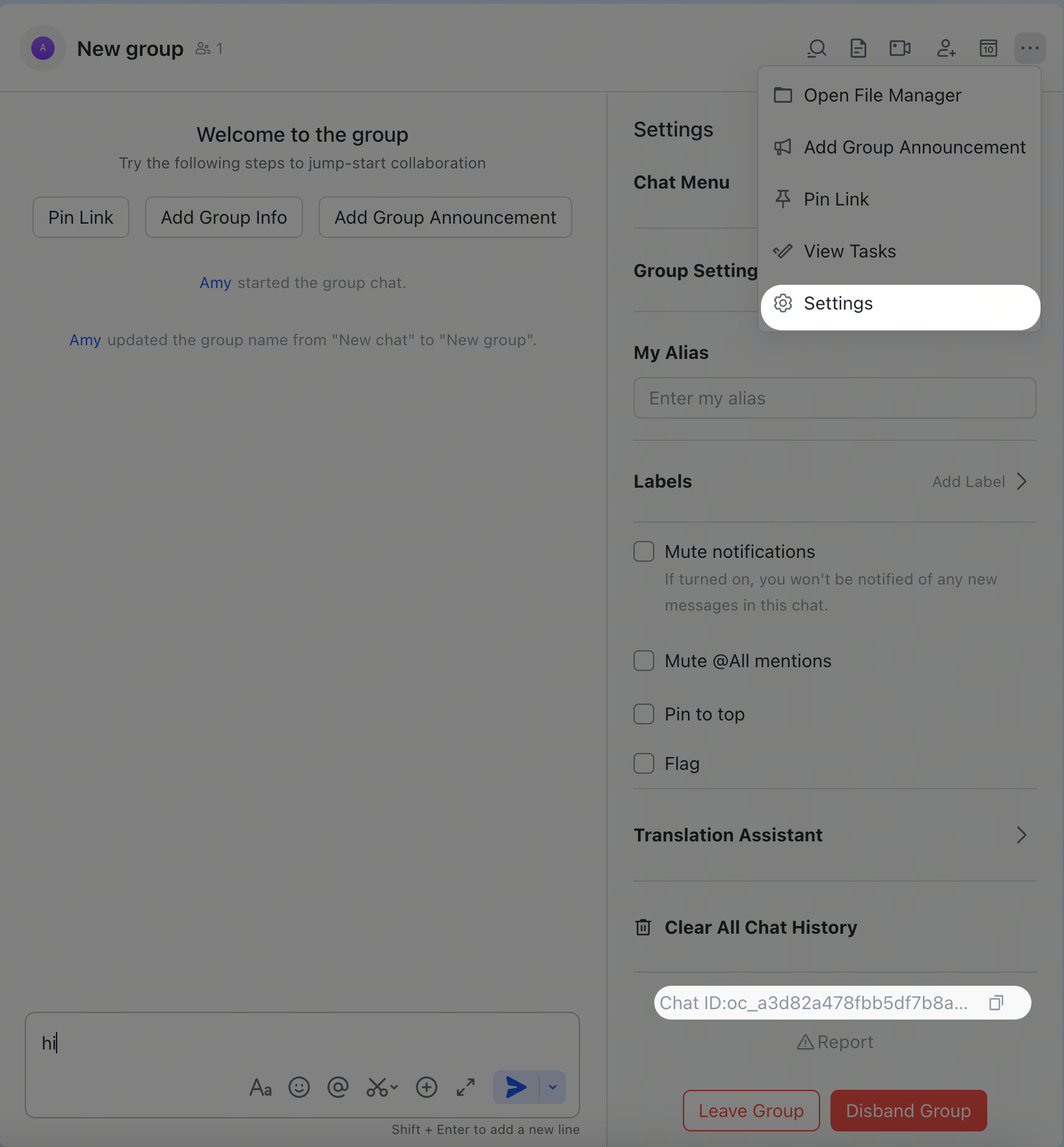
    ) is listed on the settings page.

    Get Group ID

    Get Group ID

    User IDs (
    text
    open_id
    , format:
    text
    ou_xxx
    )

    Start the gateway, send a DM to the bot, then check the logs:

    bash
    openclaw logs --follow

    Look for

    text
    open_id
    in the log output. You can also check pending pairing requests:

    bash
    openclaw pairing list feishu

    Common commands

    CommandDescription
    text
    /status
    Show bot status
    text
    /reset
    Reset the current session
    text
    /model
    Show or switch the AI model

    note

    Feishu/Lark does not support native slash-command menus, so send these as plain text messages.

    Troubleshooting

    Bot does not respond in group chats

    1. Ensure the bot is added to the group
    2. Ensure you @mention the bot (required by default)
    3. Verify
      text
      groupPolicy
      is not
      text
      "disabled"
    4. Check logs:
      text
      openclaw logs --follow

    Bot does not receive messages

    1. Ensure the bot is published and approved in Feishu Open Platform / Lark Developer
    2. Ensure event subscription includes
      text
      im.message.receive_v1
    3. Ensure persistent connection (WebSocket) is selected
    4. Ensure all required permission scopes are granted
    5. Ensure the gateway is running:
      text
      openclaw gateway status
    6. Check logs:
      text
      openclaw logs --follow

    App Secret leaked

    1. Reset the App Secret in Feishu Open Platform / Lark Developer
    2. Update the value in your config
    3. Restart the gateway:
      text
      openclaw gateway restart

    Advanced configuration

    Multiple accounts

    json5
    { channels: { feishu: { defaultAccount: "main", accounts: { main: { appId: "cli_xxx", appSecret: "xxx", name: "Primary bot", tts: { providers: { openai: { voice: "shimmer" }, }, }, }, backup: { appId: "cli_yyy", appSecret: "yyy", name: "Backup bot", enabled: false, }, }, }, }, }

    text
    defaultAccount
    controls which account is used when outbound APIs do not specify an
    text
    accountId
    .
    text
    accounts.<id>.tts
    uses the same shape as
    text
    messages.tts
    and deep-merges over global TTS config, so multi-bot Feishu setups can keep shared provider credentials globally while overriding only voice, model, persona, or auto mode per account.

    Message limits

    • text
      textChunkLimit
      — outbound text chunk size (default:
      text
      2000
      chars)
    • text
      mediaMaxMb
      — media upload/download limit (default:
      text
      30
      MB)

    Streaming

    Feishu/Lark supports streaming replies via interactive cards. When enabled, the bot updates the card in real time as it generates text.

    json5
    { channels: { feishu: { streaming: true, // enable streaming card output (default: true) blockStreaming: true, // enable block-level streaming (default: true) }, }, }

    Set

    text
    streaming: false
    to send the complete reply in one message.

    Quota optimization

    Reduce the number of Feishu/Lark API calls with two optional flags:

    • text
      typingIndicator
      (default
      text
      true
      ): set
      text
      false
      to skip typing reaction calls
    • text
      resolveSenderNames
      (default
      text
      true
      ): set
      text
      false
      to skip sender profile lookups
    json5
    { channels: { feishu: { typingIndicator: false, resolveSenderNames: false, }, }, }

    ACP sessions

    Feishu/Lark supports ACP for DMs and group thread messages. Feishu/Lark ACP is text-command driven — there are no native slash-command menus, so use

    text
    /acp ...
    messages directly in the conversation.

    Persistent ACP binding

    json5
    { agents: { list: [ { id: "codex", runtime: { type: "acp", acp: { agent: "codex", backend: "acpx", mode: "persistent", cwd: "/workspace/openclaw", }, }, }, ], }, bindings: [ { type: "acp", agentId: "codex", match: { channel: "feishu", accountId: "default", peer: { kind: "direct", id: "ou_1234567890" }, }, }, { type: "acp", agentId: "codex", match: { channel: "feishu", accountId: "default", peer: { kind: "group", id: "oc_group_chat:topic:om_topic_root" }, }, acp: { label: "codex-feishu-topic" }, }, ], }

    Spawn ACP from chat

    In a Feishu/Lark DM or thread:

    text
    /acp spawn codex --thread here

    text
    --thread here
    works for DMs and Feishu/Lark thread messages. Follow-up messages in the bound conversation route directly to that ACP session.

    Multi-agent routing

    Use

    text
    bindings
    to route Feishu/Lark DMs or groups to different agents.

    json5
    { agents: { list: [ { id: "main" }, { id: "agent-a", workspace: "/home/user/agent-a" }, { id: "agent-b", workspace: "/home/user/agent-b" }, ], }, bindings: [ { agentId: "agent-a", match: { channel: "feishu", peer: { kind: "direct", id: "ou_xxx" }, }, }, { agentId: "agent-b", match: { channel: "feishu", peer: { kind: "group", id: "oc_zzz" }, }, }, ], }

    Routing fields:

    • text
      match.channel
      :
      text
      "feishu"
    • text
      match.peer.kind
      :
      text
      "direct"
      (DM) or
      text
      "group"
      (group chat)
    • text
      match.peer.id
      : user Open ID (
      text
      ou_xxx
      ) or group ID (
      text
      oc_xxx
      )

    See Get group/user IDs for lookup tips.


    Configuration reference

    Full configuration: Gateway configuration

    SettingDescriptionDefault
    text
    channels.feishu.enabled
    Enable/disable the channel
    text
    true
    text
    channels.feishu.domain
    API domain (
    text
    feishu
    or
    text
    lark
    )
    text
    feishu
    text
    channels.feishu.connectionMode
    Event transport (
    text
    websocket
    or
    text
    webhook
    )
    text
    websocket
    text
    channels.feishu.defaultAccount
    Default account for outbound routing
    text
    default
    text
    channels.feishu.verificationToken
    Required for webhook mode—
    text
    channels.feishu.encryptKey
    Required for webhook mode—
    text
    channels.feishu.webhookPath
    Webhook route path
    text
    /feishu/events
    text
    channels.feishu.webhookHost
    Webhook bind host
    text
    127.0.0.1
    text
    channels.feishu.webhookPort
    Webhook bind port
    text
    3000
    text
    channels.feishu.accounts.<id>.appId
    App ID—
    text
    channels.feishu.accounts.<id>.appSecret
    App Secret—
    text
    channels.feishu.accounts.<id>.domain
    Per-account domain override
    text
    feishu
    text
    channels.feishu.accounts.<id>.tts
    Per-account TTS override
    text
    messages.tts
    text
    channels.feishu.dmPolicy
    DM policy
    text
    allowlist
    text
    channels.feishu.allowFrom
    DM allowlist (open_id list)[BotOwnerId]
    text
    channels.feishu.groupPolicy
    Group policy
    text
    allowlist
    text
    channels.feishu.groupAllowFrom
    Group allowlist—
    text
    channels.feishu.requireMention
    Require @mention in groups
    text
    true
    text
    channels.feishu.groups.<chat_id>.requireMention
    Per-group @mention override; explicit IDs also admit the group in allowlist modeinherited
    text
    channels.feishu.groups.<chat_id>.enabled
    Enable/disable a specific group
    text
    true
    text
    channels.feishu.textChunkLimit
    Message chunk size
    text
    2000
    text
    channels.feishu.mediaMaxMb
    Media size limit
    text
    30
    text
    channels.feishu.streaming
    Streaming card output
    text
    true
    text
    channels.feishu.blockStreaming
    Block-level streaming
    text
    true
    text
    channels.feishu.typingIndicator
    Send typing reactions
    text
    true
    text
    channels.feishu.resolveSenderNames
    Resolve sender display names
    text
    true

    Supported message types

    Receive

    • ✅ Text
    • ✅ Rich text (post)
    • ✅ Images
    • ✅ Files
    • ✅ Audio
    • ✅ Video/media
    • ✅ Stickers

    Inbound Feishu/Lark audio messages are normalized as media placeholders instead of raw

    text
    file_key
    JSON. When
    text
    tools.media.audio
    is configured, OpenClaw downloads the voice-note resource and runs shared audio transcription before the agent turn, so the agent receives the spoken transcript. If Feishu includes transcript text directly in the audio payload, that text is used without another ASR call. Without an audio transcription provider, the agent still receives a
    text
    <media:audio>
    placeholder plus the saved attachment, not the raw Feishu resource payload.

    Send

    • ✅ Text
    • ✅ Images
    • ✅ Files
    • ✅ Audio
    • ✅ Video/media
    • ✅ Interactive cards (including streaming updates)
    • ⚠️ Rich text (post-style formatting; doesn't support full Feishu/Lark authoring capabilities)

    Native Feishu/Lark audio bubbles use the Feishu

    text
    audio
    message type and require Ogg/Opus upload media (
    text
    file_type: "opus"
    ). Existing
    text
    .opus
    and
    text
    .ogg
    media is sent directly as native audio. MP3/WAV/M4A and other likely audio formats are transcoded to 48kHz Ogg/Opus with
    text
    ffmpeg
    only when the reply requests voice delivery (
    text
    audioAsVoice
    / message tool
    text
    asVoice
    , including TTS voice-note replies). Ordinary MP3 attachments stay regular files. If
    text
    ffmpeg
    is missing or conversion fails, OpenClaw falls back to a file attachment and logs the reason.

    Threads and replies

    • ✅ Inline replies
    • ✅ Thread replies
    • ✅ Media replies stay thread-aware when replying to a thread message

    For

    text
    groupSessionScope: "group_topic"
    and
    text
    "group_topic_sender"
    , native Feishu/Lark topic groups use the event
    text
    thread_id
    (
    text
    omt_*
    ) as the canonical topic session key. Normal group replies that OpenClaw turns into threads keep using the reply root message ID (
    text
    om_*
    ) so the first turn and follow-up turn stay in the same session.


    Related

    • Channels Overview — all supported channels
    • Pairing — DM authentication and pairing flow
    • Groups — group chat behavior and mention gating
    • Channel Routing — session routing for messages
    • Security — access model and hardening

    © 2024 TaskFlow Mirror

    Powered by TaskFlow Sync Engine